Table of Contents
A busy doctor sees dozens of patients every day. For each one, the doctor listens, examines, decides on the treatment and then has to write a prescription, often in a hurry. When this is done by hand, some problems are almost certain. The handwriting may be hard to read, the dose may be written differently from what was intended, the history of the patient may be buried in an old file, and the same patient may return a month later with no record of what was given before.
Doctor prescription software solves these problems. It helps the doctor write clear and complete prescriptions in less time, keeps every patient record in one place and makes follow up simple. This guide explains how it works, which features matter, how to choose the right software and how to start without disturbing your practice.
What Is Doctor Prescription Software
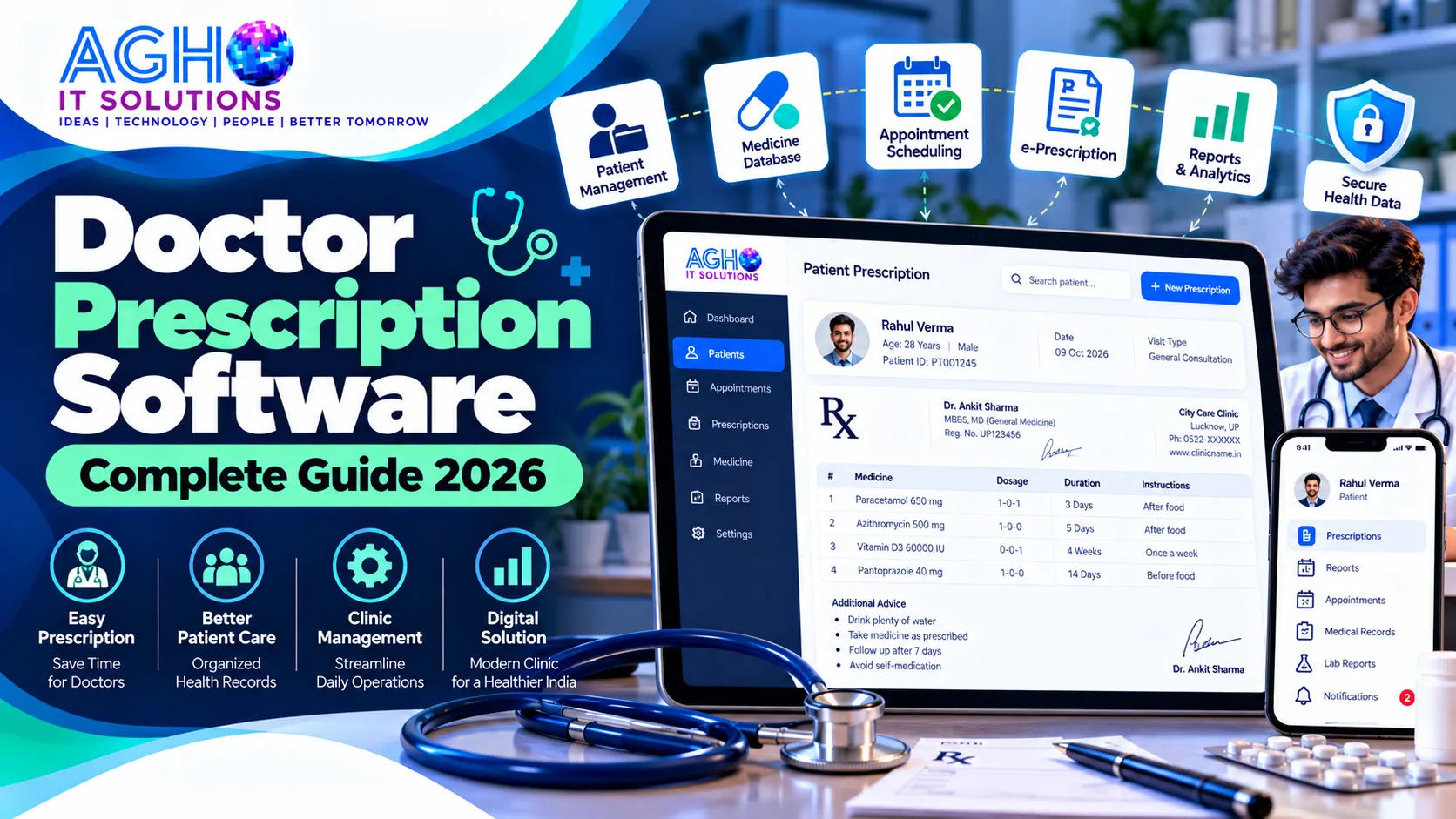
Doctor prescription software is a computer or mobile based system that lets a doctor create, print and store prescriptions digitally. The doctor selects medicines, doses and instructions from ready lists and templates, and the system produces a neat prescription with the clinic name, doctor details and patient information. It also saves the visit in the patient record so that history is available the next time.
It is also called digital prescription software, e prescription software or prescription writer. Many systems go beyond prescriptions and work as a complete clinic management or EMR system, which includes appointments, billing and patient records.
Problems with Handwritten Prescriptions and Paper Files
- Poor handwriting can lead to confusion for the patient and the pharmacist.
- Writing the same medicines again and again takes time during a busy OPD.
- Patient history is stored in paper files that are slow to search and easy to lose.
- There is no automatic check for drug allergies or medicines that should not be taken together.
- Patients forget when to come back, and the doctor has no easy way to remind them.
- Copies of old prescriptions are hard to give when a patient asks for them.
- Daily collection, number of patients and common diseases cannot be seen without manual counting.
Key Features Every Doctor Should Look For
1. Quick Patient Registration and OPD Records
A new patient should be registered in seconds with name, age, gender, phone number and address, and given a unique ID. Returning patients should be found instantly by name or mobile number, with all earlier visits shown on one screen.
2. Fast Prescription Writing
The main reason to use the software is speed. The doctor should be able to choose medicines, dose, frequency and duration from quick lists and finish a prescription in a short time. Favourite medicines and common combinations should be saved for one click use.
3. Medicine Database
A good system includes a searchable list of medicine brands and generic names. It should also let you add your own medicines so that your daily prescribing habits are always available.
4. Prescription Templates
Create templates for common conditions such as fever, cough, diabetes follow up or skin problems. Choose a template, change what is needed and the prescription is ready. This saves a lot of time during a busy day.
5. Complaints, Diagnosis and Advice
The doctor should be able to record symptoms, examination findings, diagnosis and written advice, such as diet, rest and warning signs. Advice in Hindi as well as English helps many patients understand better.
6. Vitals and Medical History
Blood pressure, pulse, temperature, weight, blood sugar and other readings should be saved with each visit. A history of allergies, long term conditions and past treatment helps the doctor take better decisions.
7. Allergy and Interaction Alerts
Some software warns the doctor when a medicine may clash with a known allergy or with another prescribed medicine. These alerts are only a safety aid. The final decision always stays with the doctor.
8. Investigations and Lab Orders
The doctor can add tests to the prescription and keep the reports in the patient file. If your clinic works with a lab, a connected pathology management software lets reports reach the doctor and patient quickly.
9. Print, PDF and WhatsApp Sharing
The prescription should print neatly on your own letterhead, and should also be saved as a PDF and shared with the patient on WhatsApp or SMS. This is very convenient for patients who lose paper slips.
10. Custom Letterhead
Your prescription should carry your name, qualification, registration number, clinic address, timings and logo. The format should match your style so patients recognize your clinic.
11. Appointments and Queue Management
Book appointments by phone or online, manage walk in patients and show the queue to the reception. This reduces crowding in the waiting area and saves time for the patients.
12. Follow Up Reminders
The software can remind patients about the next visit, medicine timing or a repeat test, by SMS or WhatsApp. This improves treatment results and brings patients back to your clinic. You can also use our bulk WhatsApp marketing and bulk SMS marketing services to send health tips and camp announcements.
13. Billing and Daily Collection
Prepare consultation and procedure bills, record payments and see the daily collection at a glance. This removes the need for a separate register.
14. Certificates and Letters
Create medical certificates, fitness letters and referral letters from saved formats in a few clicks.
15. Reports and Analysis
See how many patients visited each day, the most common diagnoses, income by month and follow up lists. These numbers help you plan your time and services.
16. Multi Doctor and Staff Access
For a polyclinic or nursing home, each doctor should have a separate login, and the reception and billing staff should see only what they need.
17. Data Security and Backup
Patient records are very sensitive. The system should have login protection, role based access and regular automatic backup so that data stays safe even if a computer is lost or damaged.
Benefits for Doctors and Patients
- Saves time: Prescriptions are ready in a fraction of the time of handwriting.
- Clear and professional: Every prescription is neat and complete.
- Fewer errors: Standard lists and alerts reduce mistakes.
- Complete patient history: Past visits, reports and medicines are available in seconds.
- Better follow up: Reminders bring patients back at the right time.
- Patient convenience: Prescriptions can be shared on phone and never get lost.
- Better management: Reports show how your practice is performing.
Who Can Use Prescription Software
- Single doctors running a private clinic.
- Specialists such as physicians, paediatricians, gynaecologists, dermatologists, orthopaedic doctors, ENT and eye doctors.
- Dentists and dental clinics.
- Polyclinics with several doctors.
- Nursing homes and small hospitals.
- Diagnostic centres with consultant doctors.
Every specialty has its own needs. A dentist needs a tooth chart, a paediatrician needs weight based dosing support and vaccination records, and a gynaecologist needs pregnancy tracking. Always check that the software can be set up for your specialty.
Legal Points and Good Practice
A prescription is a medical document, so it should be complete and accurate. It normally carries the doctor name, qualification, registration number, the date, and the patient details along with the medicines and instructions. For online consultations, doctors in India are expected to follow the telemedicine guidelines issued by the National Medical Commission, so keep yourself updated with the latest rules. Some software also supports the digital health ID system of the Ayushman Bharat Digital Mission, so ask your provider if this is important for your practice.
Keep patient records safe and share them only with the patient or with the permission of the patient. Read our guide on India data protection rules for businesses to understand why privacy matters so much when you handle personal data, and our tips on protecting your website and systems from cyber attacks.
How to Choose the Right Prescription Software
- Match it to your practice. A solo doctor and a nursing home need different features.
- Ask for a live demo. Write a full prescription yourself and check how many steps it takes.
- Check the speed. The best software lets you write a prescription in a minute or two.
- Look at the medicine list. Make sure you can add your own medicines and templates.
- Check for your specialty. The forms and charts should suit your work.
- Confirm printing and sharing. The output should match your letterhead and be easy to share.
- Ask about offline use. If your internet is not stable, check how the software works without it.
- Check support and training. Choose a provider who trains you and your staff and responds quickly.
- Understand the full cost. Ask what is included, such as setup, training, updates, storage, number of doctors and support.
Cloud Based or Offline Software
Cloud based software stores data online, so you can open patient records from your clinic, home or phone, and backup is handled for you. Offline software runs on one computer in your clinic and works even without the internet. Some systems offer both. For doctors who work at more than one place, cloud software is usually easier, while a single clinic with an unstable connection may prefer offline use. You can read more in our guide on cloud software versus on premise software for businesses in Lucknow.
How to Start Using the Software Smoothly
- Step 1: List your common medicines, templates and advice texts.
- Step 2: Set up your letterhead with name, registration number, timings and logo.
- Step 3: Register your staff and give each person the right access.
- Step 4: Import or enter your regular patients if you want their history ready.
- Step 5: Train your reception and assistants on registration, billing and appointments.
- Step 6: Use the software together with your old method for a few days.
- Step 7: Switch fully and add more templates as you find repeated needs.
Common Mistakes to Avoid
- Choosing software that is slow and makes prescription writing longer than handwriting.
- Not setting up templates and favourite medicines at the start.
- Ignoring regular backup.
- Sharing one login among all staff.
- Not checking the output format on real printed paper before going live.
- Depending fully on alerts and not using clinical judgment.
Grow Your Practice Online
Good software helps you serve patients well, but new patients must be able to find you. A complete Google Business Profile with correct timings, photos, services and genuine patient reviews makes your clinic show up when people search for a doctor near them. Learn how in our guide on Google Business Profile optimization for Lucknow businesses.
A simple website with your profile, services, timings and an appointment form builds trust, and our team provides website development and SEO services to help your clinic get found on Google. If you want a patient app with appointments and reports, our app development service can build it, and a CRM software can help you manage patient follow ups and enquiries.
Doctor Prescription Software from Agho IT Solutions
At Agho IT Solutions in Lucknow, we provide doctor prescription software for doctors, clinics and nursing homes, along with complete hospital management software for larger set ups. Our team can help you with setup, training and support. You can also see our full range of Medical IT solutions, and if you run a diagnostic lab, read our guide on pathology lab management software.
Call us on +91-9194046587 or visit us at L-III/77, Sector-D, Aliganj, Lucknow, Uttar Pradesh 226024. You can also contact us online to book a free demo.
Frequently Asked Questions
Is prescription software suitable for a single doctor clinic?
Yes. Even a solo doctor benefits from faster prescriptions, saved patient history and easy follow up. Software can be chosen according to the size of the practice.
Can I print the prescription on my own letterhead?
Yes. Good software lets you design the prescription with your name, qualification, registration number, clinic address and logo, and print it on plain or pre printed paper.
Can patients receive the prescription on WhatsApp?
Most modern systems can share the prescription as a PDF on WhatsApp or SMS, so patients always have a copy on their phone.
Does the software warn about drug interactions and allergies?
Many systems offer alerts for allergies and medicine clashes. These alerts are a helpful aid, and the final prescribing decision always remains with the doctor.
Is patient data safe in digital software?
It can be very safe if the software has login protection, access control and regular backup, and if you follow good practices such as strong passwords and not sharing logins.
Can the software work without internet?
Some software works offline on a local computer and some works on the cloud. Ask your provider how the system behaves when the internet is slow or not available.
How long does it take to start using it?
A clinic can usually begin within a few days once the letterhead, medicines and templates are ready, and a short trial period with the old method helps the team settle in.